
Remember me







 by Johnnie BehiriYesterday
Strada’s version 2.0 platform mounts a collaborator’s storage as a virtual drive inside macOS Finder or Windows File Explorer, letting a remote editor cut from media that never moves off the drive it was ingested onto. Desktop apps are now available for macOS 13 and Windows 11 alongside iOS and Android companions, with remote editing starting at $8 per user per month and a free tier for browsing and viewing. Here is how the peer-to-peer architecture works, what it actually costs, and where the practical limits sit.
We have been following Strada since brothers Michael Cioni (formerly Frame.io and Adobe) and Peter Cioni (formerly Netflix) founded the company in 2023, from the original beta launch through the introduction of Strada Agents, our camera-to-editor transfer test, the Strada Connect demonstration at NAB 2026, and our Strada 2 first look at Cine Gear 2026. The platform started life as an AI-driven media search tool. According to the company, extensive customer feedback pushed it in a different direction: the bottleneck was never finding footage, it was reaching all of it quickly and affordably. Version 2.0 is the result of that pivot, and it is worth looking at as a workflow proposition rather than a demo.
 Image credit: StradaWhat Strada Connect actually does
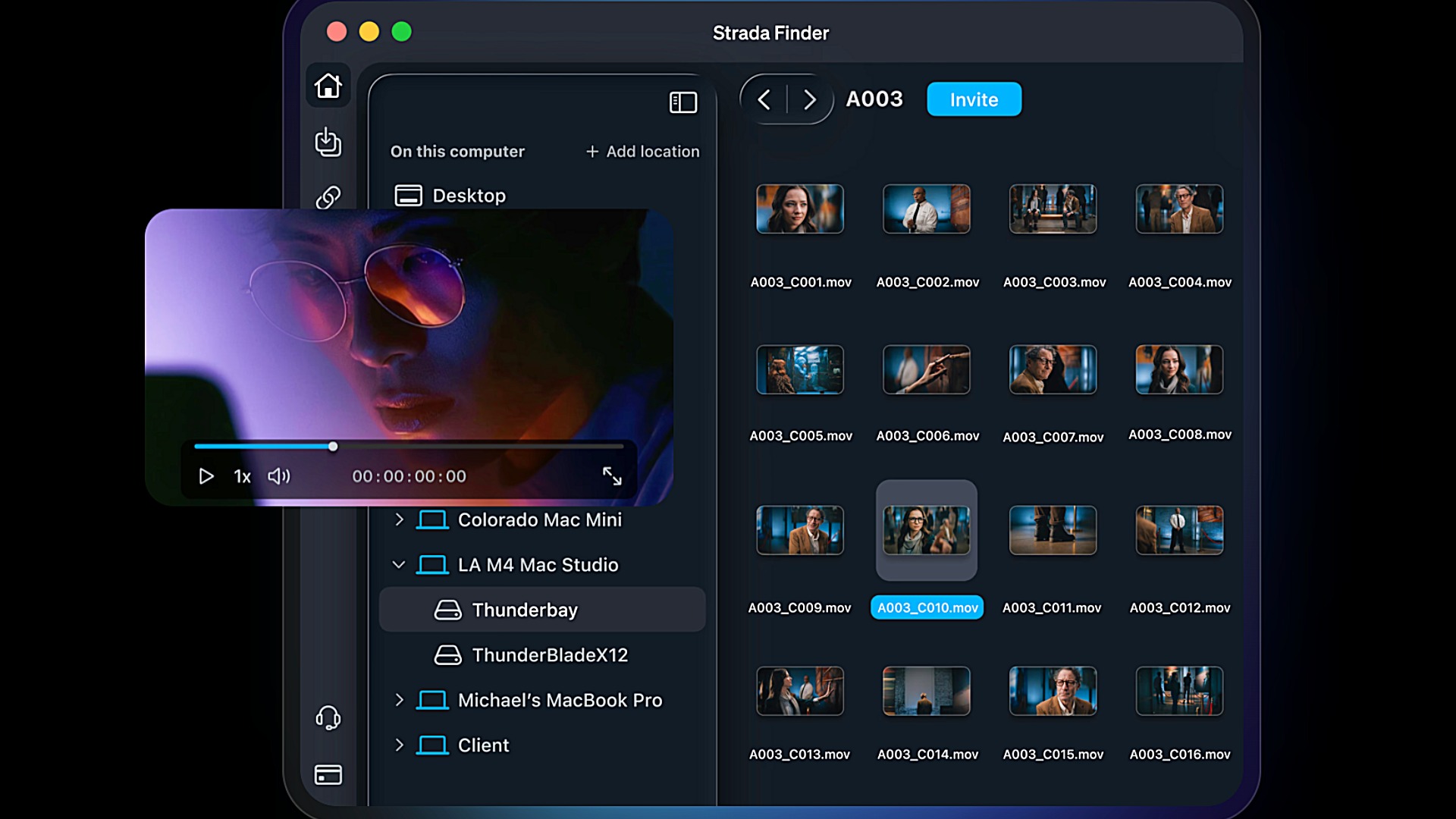
The core mechanic is simple to describe and unusual in practice. A collaborator invites you to a folder or a whole drive, and that folder appears in your Finder as though it were a locally attached volume. You browse it, preview clips, and drag material straight into Premiere Pro, DaVinci Resolve, Photoshop, or Pro Tools. No upload step, no download step, no third-party bucket sitting between the two machines.
Underneath sits Strada Agents, the peer-to-peer networking layer the company unveiled at NAB 2025. The Agent runs as a desktop application on the machine holding the media and exposes attached storage to authorized users. Strada says this works across internal drives, direct-attached drives, RAID arrays, network-attached storage, and even camera cards, without dedicated hardware. When a remote editor opens a clip, only the bytes needed for playback and scrubbing travel across the connection, with local caching as the session continues.
The most useful reference point is a real project rather than a booth demo. Ryan Connolly of Film Riot cut the short film “Work in Progress”, made in collaboration with FUJIFILM, using Strada Connect: roughly 7TB of source media, a team spread about 1,500 miles apart, editing in Premiere Pro over a home internet connection. Connolly’s description is that the material played like local footage and he could not really tell the difference. That short is the same production behind the GFX ETERNA 55 and ARRI ALEXA 35 comparison Cioni published earlier this year, so the footage in question was large-format and heavy.
Four tools sharing one windowVersion 2.0 groups the platform into four functions, all reachable from the same Finder-style interface. Connect handles the virtual drive and remote editing. Transfer moves files directly between computers, with folder or file selection, a destination picker for any device you have access to, bandwidth throttling, transfer monitoring, and checksum reports for verification. That last item matters for anyone who has ever had to prove a delivery arrived intact.
Sharing covers invitations and access control. Upload Links close the loop in the other direction: you pick a folder, generate a link, optionally attach a password or an expiration date, and send it to anyone. The recipient uploads straight into that folder without needing a Strada account or a login, which is a tidier answer than a WeTransfer round trip when a client needs to send you a logo, a music cue, or a batch of stills. All active and inactive links are managed from one page, with upload tracking per link.
Who sees whatPermissions are folder-level and granular, which is where the model diverges from simply opening an SMB share. Strada offers five roles: Owner, with total control over the account; Admin, with full access and the ability to invite others; Edit, which allows adding files, renaming, and organizing; Download, which allows viewing and downloading; and View Only, which restricts a collaborator to browsing and playback. Nothing outside a shared folder is reachable, permissions can be changed at any time, and access removal is immediate.
Licensing follows team size. Individual users and small teams can buy up to ten seats directly from the billing page, while larger organizations move to the separate Enterprise License Manager. That structure will suit a documentary cutting room or a boutique post house more comfortably than a facility running hundreds of seats, which is roughly the market Strada appears to be aiming at.
Where the media actually livesFor anyone handling embargoed or contractually protected material, the architecture deserves scrutiny, and Strada has published a reasonably detailed security document. The central claim is that no media is stored or cached in Strada’s cloud infrastructure at any point. The company’s servers handle authentication, authorization, coordination, and connection brokering, while the files stay on hardware the customer controls.
Peer connections are authenticated with public-key cryptography using Ed25519 keys generated locally on each device, which Strada says are never shared with its infrastructure. The limited metadata the company does hold is encrypted at rest with AES-256, and traffic in transit uses TLS. Identity is handled through Auth0, with Google, Apple (on iOS), or email and password sign-in; note that the email and password route does not currently support two-factor authentication, single sign-on, or passkeys, so a Google Workspace login is the stronger option for a team.
There is a blunt physical control here too, and it is arguably the most persuasive part of the pitch: if the Agent is logged out or offline, no remote session can be established, and unplugging the drive air-gaps the media instantly. On the compliance side, Strada states it has completed the AWS Foundational Technical Review and is working toward SOC 2 Type II and ISO 27001 certification, neither of which is finished. Facilities with client-mandated security audits will want to track that timeline before committing.
 Credit: StradaThe cost argument, and where to press on it
Strada’s positioning is that it sells a protocol rather than storage, and the pricing reflects that: you pay per seat, not per terabyte. The company’s own comparison table models five users and 20TB of media, putting its platform at $150 per month, or $1,800 per year, against figures ranging from $595 to $1,500 per month for cloud-based alternatives that meter storage. Those are Strada’s numbers and its choice of scenario, so treat them as a directional argument rather than a quote, and note that the monthly figure does not map cleanly onto the published per-seat tiers.
The logic behind it is sound enough, though, and it lands differently in 2026 than it would have two years ago. Storage economics are under real pressure at the moment, as we covered in our look at the global memory shortage and its effect on NAND, DRAM, and drive prices. A model that lets teams keep using capacity they already bought, instead of renting a second copy of it monthly, is well timed.
The limits worth planning aroundTwo constraints follow directly from the architecture. The first is bandwidth: peer-to-peer means the host machine’s upload speed sets the ceiling for everyone pulling from it, so a single asymmetric home connection feeding three simultaneous editors is a different proposition from one editor pulling proxies. The second is uptime. The source computer has to stay awake, online, and logged in, which quietly turns an editor’s workstation into infrastructure. Neither is a flaw so much as a planning consideration, but both are the kind of thing that surfaces at 2am on a delivery week rather than during a demo.
Linux support is on the roadmap but not shipping, which rules out a slice of the color and VFX world for now. And as always with playback performance claims over consumer connections, the honest answer only arrives after sustained use on a real project with real deadlines.
The free tier costs nothing and covers connecting unlimited computers and mobile devices, connecting unlimited storage, viewing unlimited assets, and assigning permissions. Basic adds remote editing through Strada Connect, unlimited file transfers, and local caching and pinning at $8 per user per month, with a 33% discount when billed annually. Pro sits at $24 per user per month, with enhanced permission controls and Upload Links, discounted 20% on annual billing, and enterprise pricing is quoted separately. Desktop apps are available for macOS 13 and later and Windows 11, with mobile apps for iOS 17 and later and Android 12 and later; full details are on the Strada Connect page and the pricing page.
Would working off a colleague’s drive instead of a cloud subscription fit your post workflow, or is the upload bandwidth the dealbreaker? Don’t hesitate to let us know in the comments below!