Google Gemini Is About to Get to Know You Way Better
Since the days when Google Gemini was still called Bard, it's been able to connect with the company's other productivity apps to help pull context from them to answer your questions—but you still had to connect those apps to the AI manually using extensions. And even after bringing your apps together, you usually had to tell Gemini where to look for your data to get much use out of its abilities. For Instance, if you wanted it to pull information from your emails, you might have started a prompt with "Search my email." Now, Google is making it easier to connect Gemini to its various services, and adding "reasoning" when pulling context from across your Google Workspace. It's calling the feature "Personal Intelligence."Rolling out in beta for paid subscribers in the U.S. today (and coming to other countries and free users "soon"), Personal Intelligence is an opt-in feature that currently works with Gmail, Photos, YouTube, and Search, all of which you can connect in one tap while setting up the feature.
That alone makes it more convenient than a collection of extensions, but there are supposedly a few upgrades to general usability as well. The biggest is that Gemini will apparently be able to "learn" about you from a grab bag of sources all at once, without you having to specify where to look, and use that information to answer your questions.
Credit: Google
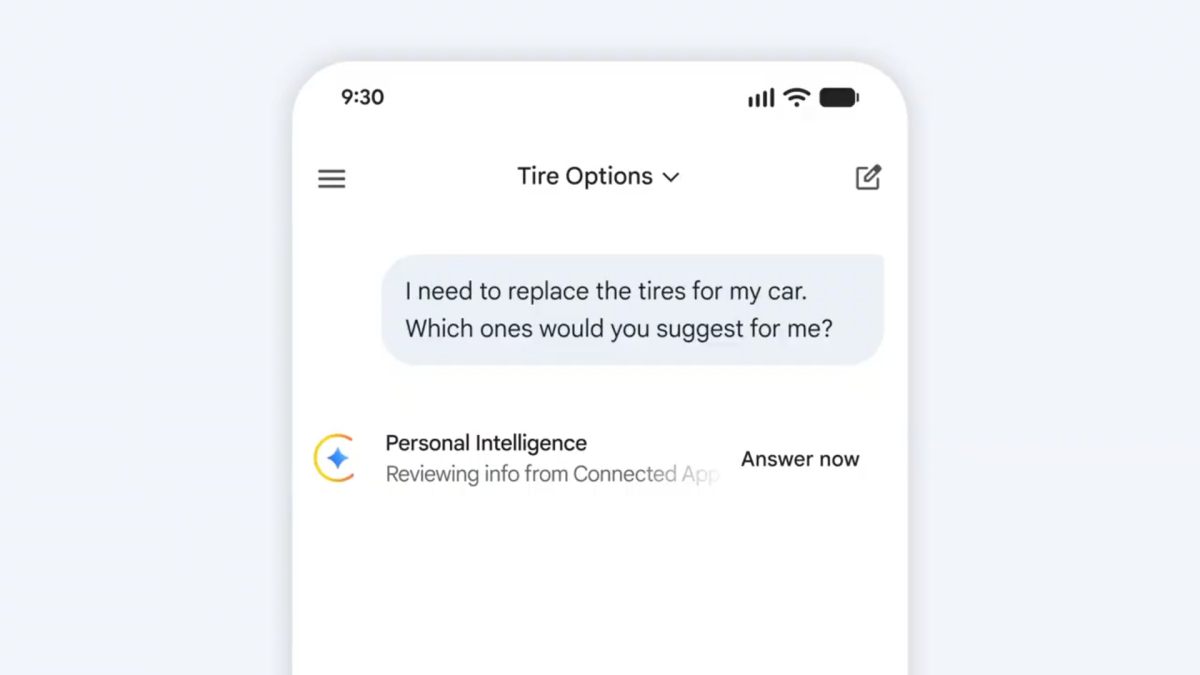
In an example, Google has a user say "I need to replace the tires for my car. Which ones would you suggest for me?" The bot then runs through multiple reasoning steps, pulling from all the data available to it, to find out what car the prompter drives and which tires would be best for it. This can take a while, which is why there's an "Answer now" button next to the reasoning progress bar to stop the bot from getting stuck. In the example, it took about 10 seconds for the AI to generate a response.
Google is promising its typical Workspace privacy guarantees with Personal Intelligence, saying "because this data already lives at Google securely, you don't have to send sensitive data elsewhere to start personalizing your experience." In other words, it's not going to move the needle on how much data about you Google can access, but at least it'll prevent you from having to connect your Workspace to third parties.
What do you think so far?
Google also says, "Gemini will try to reference or explain the information it used from your connected sources so you can verify it," although we don't have any examples of that in action yet. It's worth keeping an eye out, though, if you're worried about hallucinations. To that end, the company does suggest asking Gemini for more information about what it used to come to its answers if you're unsatisfied, and to correct it "if a response feels off," perhaps by saying something like "Remember, I prefer window seats." Theoretically, Gemini will then remember this for next time, using its existing chat history feature. If you're continually unsatisfied, you can hit the thumbs down button on responses to provide feedback.Google says that eligible users should see an invitation to try Personal Intelligence on the Gemini home screen as soon as it's rolled out to them, but if you don't, you can turn it on manually by following these steps:Open Gemini and click or tap Settings.Click or Tap Personal Intelligence.Under Connected Apps, select which apps you would like Personal Intelligence to take information from.And that's it! Remember, Personal Intelligence is off by default and is only available for paid subscribers for now, so it may be some time until you can actually use it. Google also stresses the Gemini might not personalize every response, as that will save time on more simple requests. The company also said Personal Intelligence for AI Mode in Google Search is currently planned, but does not have a set release date.