
Remember me

AI administrators deploying Claude Code and Claude Desktop across their workforce need centralized controls over authentication, model access, cost attribution, and spend enforcement. These controls reduce operational overhead and apply governance consistently at scale.
Claude apps gateway provides a self-hosted governance layer between these applications and Amazon Bedrock or Claude Platform on AWS.
Building on our launch post, this post presents a production reference deployment covering end-to-end architecture, enterprise deployment patterns, cost, and implementation resources.
ArchitectureThis section covers the reference deployment topology and how requests flow through the gateway.
Deployment topologyClaude apps gateway ships in the same Claude Code CLI binary that developers already run. Started with claude gateway --config gateway.yaml, it runs in server mode and loads its YAML configuration at startup. In this reference deployment, the container runs on AWS Fargate inside your virtual private cloud (VPC). The same image can run on Amazon Elastic Kubernetes Service (Amazon EKS) or Amazon Elastic Compute Cloud (Amazon EC2) if either better matches your existing setup.
The reference architecture uses the following components:
Compute and state: Each AWS Fargate task runs one stateless gateway container. Amazon Relational Database Service (Amazon RDS) for PostgreSQL stores short-lived sign-in state, including device codes and sessions. When spend limits are enabled, it also stores per-user spend counters and audit records. Auth state lives in the database rather than in a task. This means any task can serve any request, with no sticky sessions required on the load balancer. Ingress and private DNS: An internal Application Load Balancer terminates TLS using an AWS Certificate Manager certificate. An Amazon Route 53 private hosted zone resolves the gateway to private IP addresses reachable through a VPN, AWS Direct Connect, or equivalent private connectivity. Service connectivity: VPC endpoints keep supported AWS service traffic private, while a NAT gateway provides other required egress. Upstream credentials: The gateway authenticates to Amazon Bedrock using the AWS Identity and Access Management (IAM) role assigned to the gateway task. The Claude Platform on AWS API key and other static credentials remain in AWS Secrets Manager. No upstream credentials are distributed to developer machines.Operational note: Configure the load balancer idle timeout to exceed the longest expected interval without data. The default is 60 seconds. The load balancer terminates connections that remain idle longer than the configured timeout. Check both delayed non-streaming responses and pauses between streaming chunks.
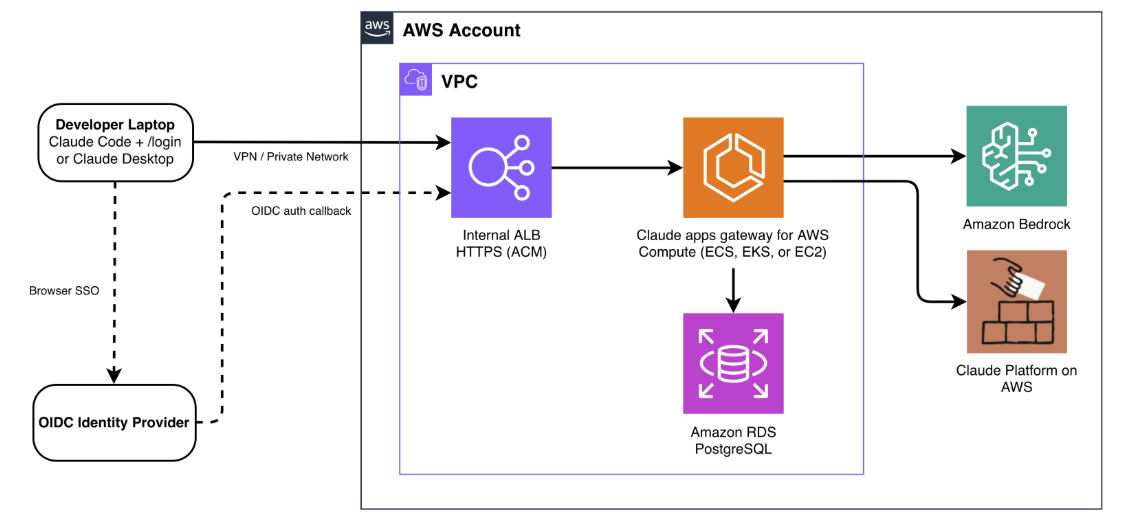
Figure 1: Reference architecture for Claude apps gateway on AWS
Sign-in (once per session). The platform team distributes managed settings that point Claude Code and Claude Desktop to the gateway’s private URL. When a developer runs /login, the client starts the OAuth 2.0 device authorization grant and opens a browser to authenticate through your OpenID Connect (OIDC) identity provider. The browser must also reach the gateway’s private endpoint because the gateway serves the device verification page. After authentication, the gateway issues a short-lived bearer token, valid for one hour by default. The session subsequently refreshes silently in the background.
Inference (every request). Every inference request carries the bearer token. The gateway validates it, resolves the developer’s identity and group membership, applies the matching policy, evaluates the applicable spend cap, and routes the request to Amazon Bedrock or Claude Platform on AWS. The response streams back to the client. The client emits usage metrics, which the gateway forwards over the OpenTelemetry Protocol (OTLP) to a collector you configure. The metrics are attributed to the authenticated identity used for policy evaluation.
For deployment scripts and configuration templates, refer to the accompanying repository. For operational guidance, refer to the deployment guide. For device code verification and token lifecycle details, refer to the Claude apps gateway documentation.
What it solvesThe gateway addresses five governance needs, each described in the following sections.
1. Identity: SSO authenticationThe gateway delegates authentication to your OIDC identity provider. Developers sign in once through browser SSO. The gateway issues a short-lived token and handles silent refresh in the background. The gateway supports OIDC-approved providers including Okta, Microsoft Entra ID, Auth0, Keycloak, or Amazon Cognito, for example.
This gives you centralized OIDC authentication with no upstream credentials on developer machines, instant offboarding through identity provider removal, and consistent per-user attribution across requests without custom instrumentation.
The gateway keeps no user directory of its own. There are no accounts to pre-create and no SCIM sync to configure. Whatever groups your identity provider assigns to a user are the groups the gateway uses for policy matching, 1:1 with no translation layer. Manage users and groups entirely in your identity provider, and the gateway picks up changes at the next session refresh. Offboarding is removing the user from your identity provider. Their session expires within the configured time to live (1 hour by default), with no credential rotation required.
The following example shows a gateway configured with Microsoft Entra ID:
oidc: issuer: https://login.microsoftonline.com/<tenant-id>/v2.0 client_id: $ client_secret: $ allowed_email_domains: [company.com] groups_claim: rolesNote: Microsoft Entra ID doesn’t include group or role claims by default. If your policies use match: with Entra app roles, add groups_claim: roles to your OIDC configuration. Without this step, the gateway cannot resolve group membership and all users match only the catch-all policy.
For per-identity-provider setup instructions, refer to the identity provider setup guide. The following images show the sign-in experience from the developer’s perspective, for both Claude Code and Claude Desktop.
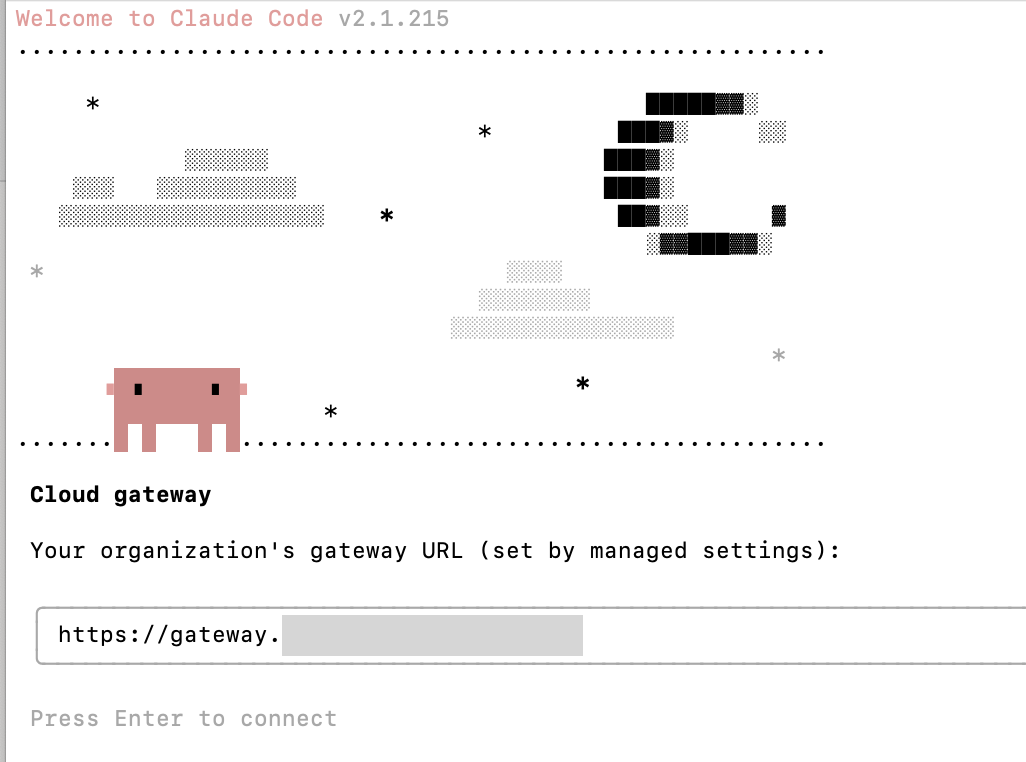
Figure 2: Authenticating through the gateway
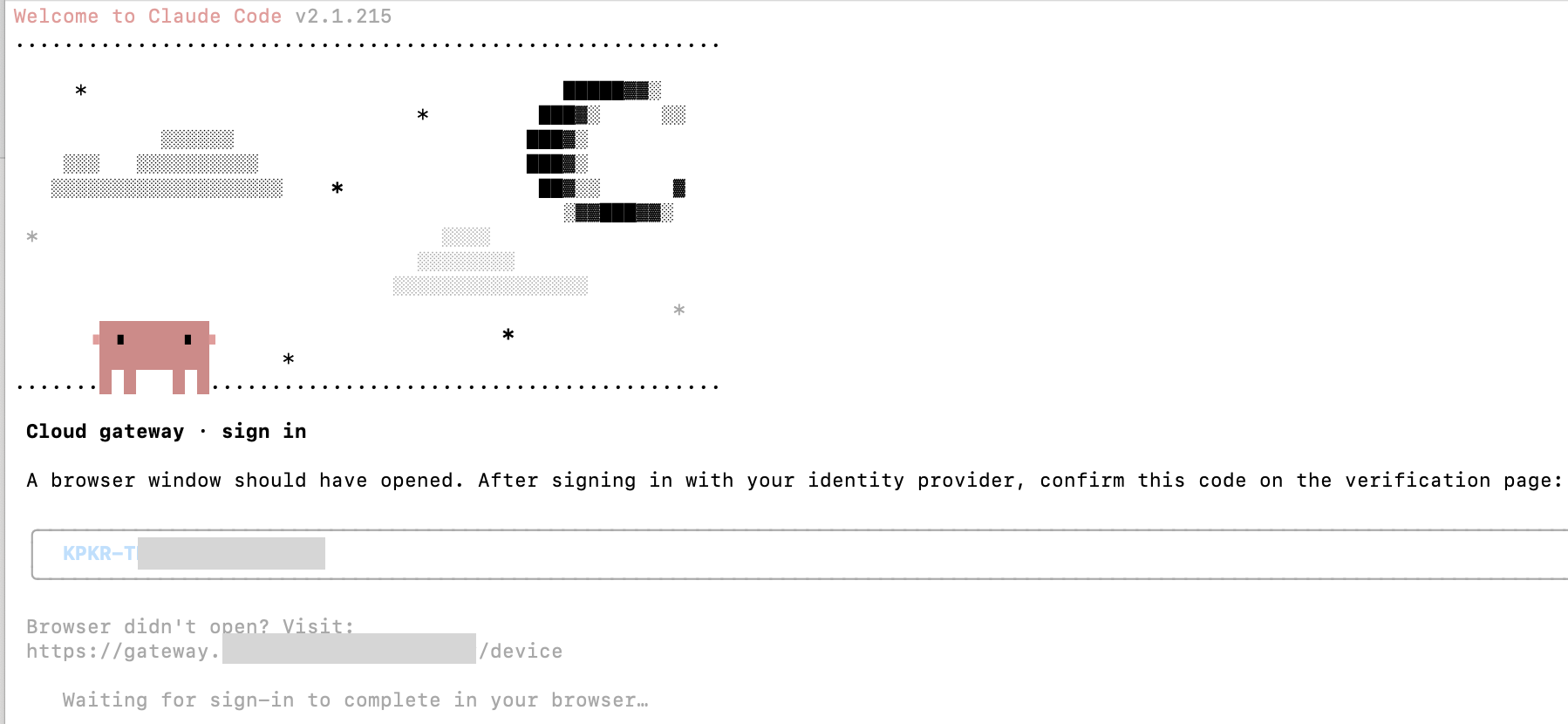
Figure 3: The gateway delegates to your existing OIDC identity provider
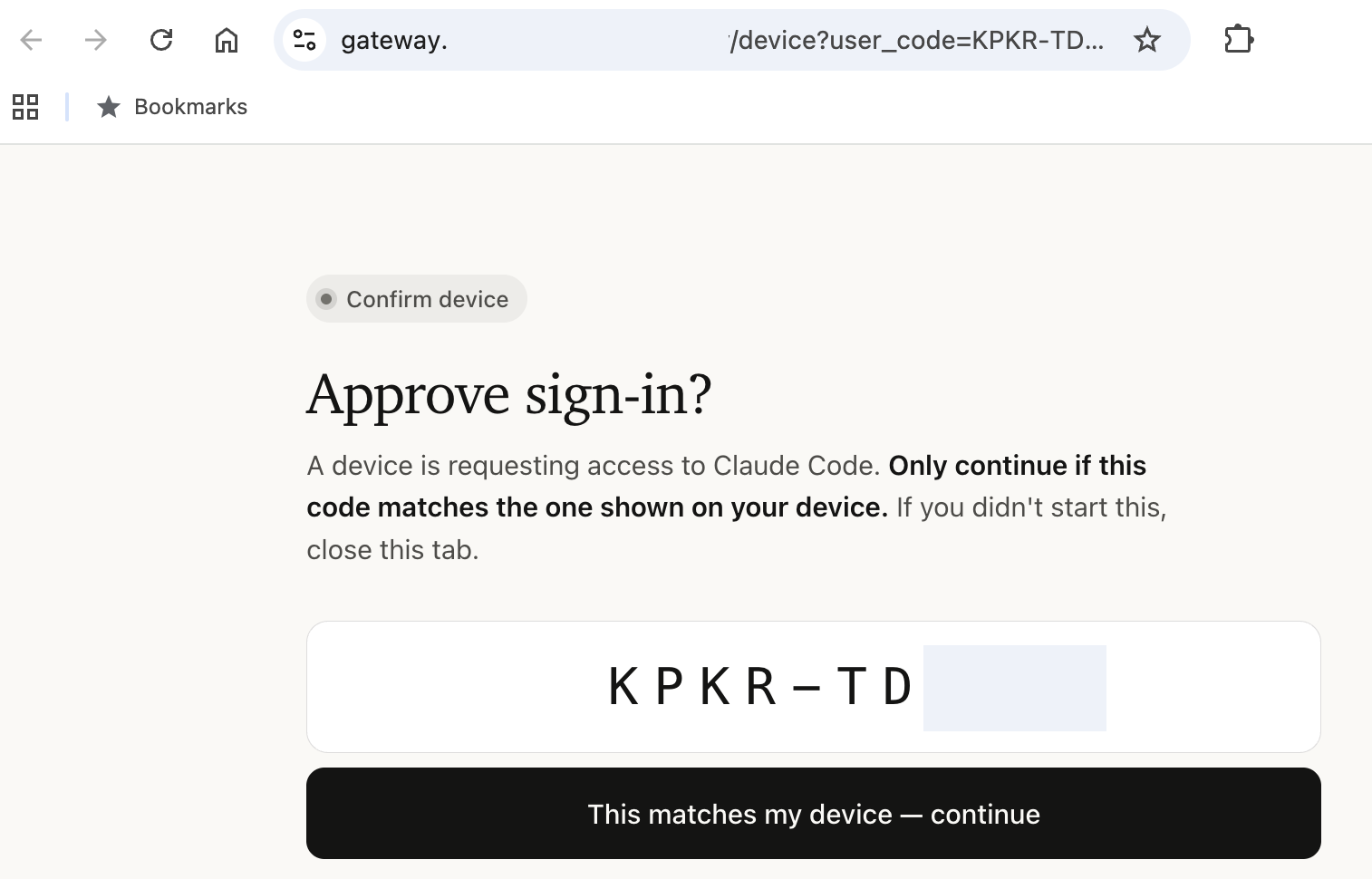
Figure 4: Authorizing the device in the browser

Figure 5: Configuring inference with Amazon Bedrock through the gateway for Claude Desktop
The gateway enforces model access server-side and distributes tool permissions as managed settings, scoped by identity provider group. You define which models and capabilities each team gets in a single YAML block. Policies are evaluated in declaration order. The first match is selected, then merged onto the match: catch-all base. End the list with a match: policy. It acts as a catch-all for users whose groups don’t match a specific policy earlier in the list. Without one, unmatched users receive full catalog access. Changes propagate to connected clients within one hour, requiring no action from developers.
Managed: policies: # Contractors: Haiku only, no web access - match: cli: availableModels: [claude-sonnet-5, claude-haiku-4-5] enforceAvailableModels: true permissions: deny: ["WebFetch", "WebSearch"] # Engineers: full model access with guardrails - match: cli: availableModels: [claude-opus-4-8, claude-sonnet-5, claude-haiku-4-5] permissions: allow: [Read, Grep, Bash, Edit] deny: ["Read(./.env)", "Read(./secrets/**)"] # Catch-all: every other authenticated user. Must be last. - match: cli: availableModels: [claude-haiku-4-5, claude-sonnet-5]Note: Include desktop: in every policy entry to turn on Claude Desktop clients. Without it, the gateway rejects Desktop inference requests for users matching that policy, even though sign-in succeeds.
Model access is enforced server-side. A developer whose group only grants Claude Haiku cannot bypass the restriction, even with a modified client. The model picker in Claude Code and Claude Desktop shows only permitted models. For the full policy schema including tool permissions and managed settings delivery, refer to the configuration reference.
The following figures show policy enforcement in action.

Figure 6: A user in the contractors group receives a 400 error when requesting Claude Opus 4.8 in Claude Code
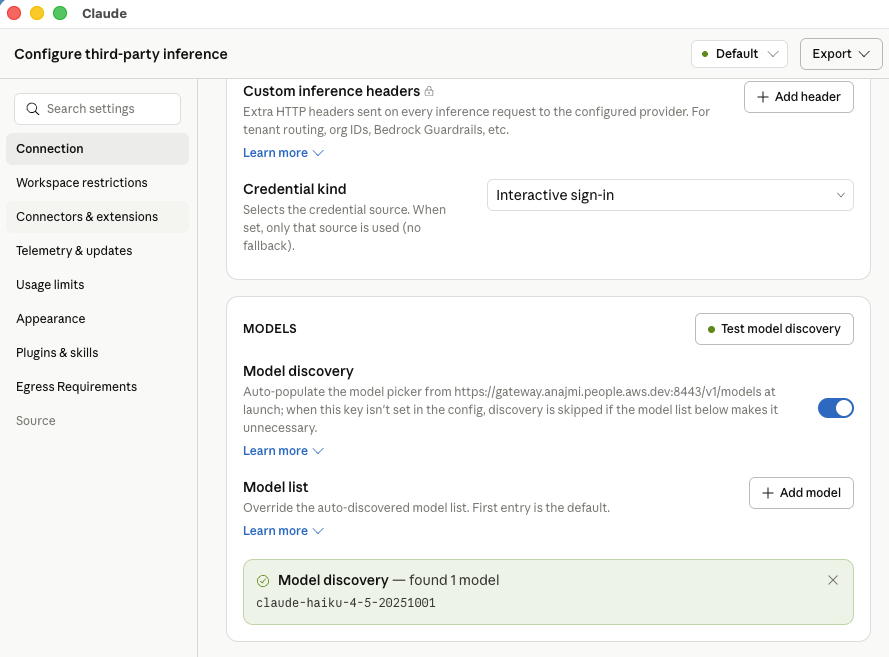
Figure 7: The same user can access only Claude Haiku in Claude Desktop
The client emits usage metrics (claude_code.token.usage, claude_code.cost.usage, and claude_code.active_time.total) attributed to the authenticated developer’s identity: user ID, email, and group membership.
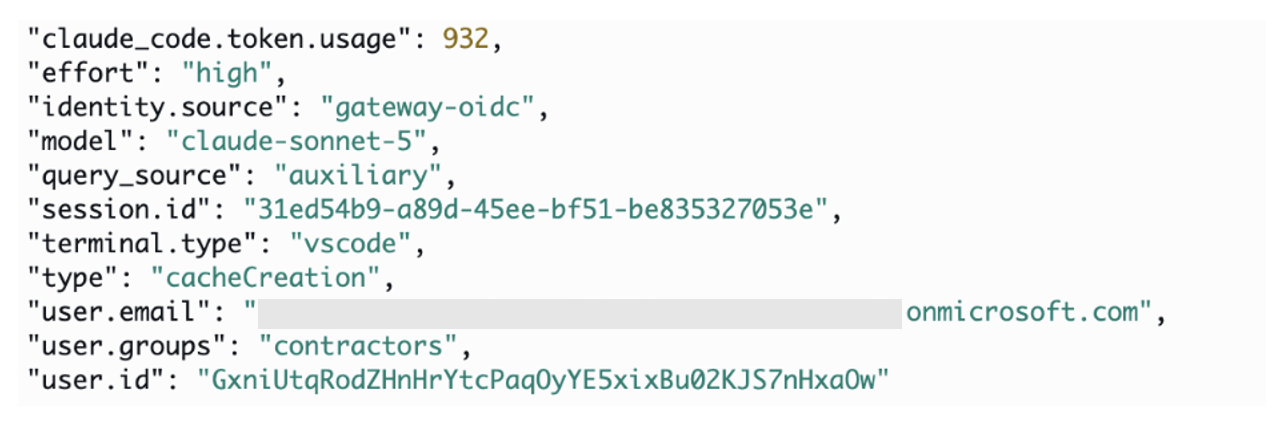
Figure 8: OpenTelemetry metrics from Claude Code sessions relayed by the gateway and exported to Amazon CloudWatch by the collector
The gateway relays this telemetry over OpenTelemetry Protocol (OTLP) to a collector you configure. Supported OTLP-compatible backends include Datadog, Splunk, Grafana, and Amazon CloudWatch through the AWS Distro for OpenTelemetry (ADOT) collector.
telemetry: forward_to: - url: https://otel-collector.internal.example.com metrics: true logs: false traces: falseLogs and traces are opt-in because they can contain source code and prompt content. Most deployments start with metrics only, which provide per-user cost and usage breakdowns without exposing sensitive data. For more information, refer to the Claude apps gateway configuration page.
4. Routing: Inference with failoverThe gateway routes inference to one or more upstreams in declared order, failing over automatically on upstream unavailability, throttling, or timeouts. Cross-provider failover can change the applicable service terms and data-processing geography.
You can configure combinations with the following upstream types:
upstreams: # Amazon Bedrock (uses ECS task role, no static keys) - name: bedrock-east provider: bedrock region: us-east-1 auth: # Amazon Bedrock in a second region for failover - name: bedrock-west provider: bedrock region: us-west-2 auth: # Claude Platform on AWS (cross-provider fallback) - name: claude-platform provider: anthropicAws region: us-east-1 workspace_id: wrkspc_01ABCDEFGHIJKLMN auth: api_key: $The Deployment patterns section shows how to combine these building blocks for common scenarios. For the full upstream configuration and provider-specific auth options, refer to the upstreams reference.
5. Spend caps: Per-user budget enforcementAWS Budgets and AWS Cost Explorer provide account-level visibility with periodic aggregation, making them well suited for organizational cost governance. The gateway complements these tools by providing inline enforcement before inference occurs, in addition to visibility into per-developer usage.
Caps are set at three levels: organization-wide defaults, per-group, and per-user overrides. Each cap applies individually per developer, not as a shared pool. The gateway resolves the effective limit for each request: a per-user override takes precedence, then the most restrictive applicable group cap, then the organization default. If no cap exists at any level, spend is unlimited. When a developer reaches their ceiling, the gateway returns HTTP 429 immediately. Counters reset automatically at the start of each period (daily, weekly, or monthly).
# Org-wide default: $500/month per developer (amounts in USD cents) curl -X POST https://<gateway>/v1/organizations/spend_limits \ -H "x-api-key: $ADMIN_KEY" \ -H "Content-Type: application/json" \ -d ',"amount":"50000","period":"monthly"}' # Tighter cap for a specific group: $10/day for contractors curl -X POST https://<gateway>/v1/organizations/spend_limits \ -H "x-api-key: $ADMIN_KEY" \ -H "Content-Type: application/json" \ -d ',"amount":"1000","period":"daily"}' # Instant shutoff for one user: set cap to zero curl -X POST https://<gateway>/v1/organizations/spend_limits \ -H "x-api-key: $ADMIN_KEY" \ -H "Content-Type: application/json" \ -d ',"amount":"0","period":"daily"}'Spend caps are separate from model access control. A group may have access to Opus, Sonnet, and Haiku. Caps govern how much that access costs, not which models are available.
Admin workflow: Caps are managed entirely through the Admin API. There is no admin UI. Platform teams typically automate this with a script that syncs limits from a checked-in config file as part of the deploy pipeline, or through Terraform calling the API. The GET /v1/organizations/spend_limits/effective endpoint shows each developer’s resolved cap and period-to-date spend for reporting.
Limitations to be aware of: Spend is estimated from token counts at list price. It’s a real-time circuit breaker, not an invoice. Committed-use discounts and negotiated rates aren’t reflected. If the database is unavailable, spend enforcement fails open by default, allowing inference to continue. Organizations requiring strict budget enforcement can set fail_closed_on_error: true to block requests instead. For authoritative billing, reconcile against Amazon Bedrock invocation logs or the AWS Cost and Usage Report. For the full Admin API reference and enforcement mechanics, refer to the spend limits documentation.

Figure 9: A user request is rejected with a 429 error on reaching the daily spend limit
How you deploy the gateway depends on your organization’s structure, traffic patterns, and governance requirements. There’s no single correct architecture.
Centralizing all Claude usage through the gateway simplifies quota management and gives you one place for cost attribution and policy enforcement. Onboarding is typically instant: a new developer joins the identity provider group and gets access. The tradeoff is that the gateway becomes shared infrastructure your platform team operates, and workloads that need native Amazon Bedrock features cannot route through it.
Running Amazon Bedrock directly in dedicated accounts gives each team isolated quotas, no shared dependency, and access to the full Amazon Bedrock feature set. Direct Amazon Bedrock deployments can use IAM roles and retain centralized billing and audit data. The tradeoff is losing the gateway’s per-developer authentication, policy, telemetry, and spend controls.
Most organizations combine both approaches in some form. The following patterns illustrate common configurations, from single-team setups to multi-account architectures. Start with the pattern closest to your current environment and evolve as your usage grows.
Pattern A: Single team, single AWS RegionRecommended for: teams evaluating the gateway or organizations with a single development group in one Region.
A minimal deployment: one Amazon Bedrock upstream in us-east-1, an org-wide daily spend cap, and all developers get the same model access. Start here. Add complexity when the use case demands it.

Figure 10: Single team in a single account and Region, with org-wide daily, weekly, and monthly caps
Best for: organizations with multiple teams that need different model access levels and spend limits. Groups from the identity provider drive differentiated policies:
Platform engineering: Opus + Sonnet + Haiku, $50/day. Application developers: Sonnet + Haiku, $20/day. Contractors: Haiku only, $5/day, web tools denied.Group limits are inherited individually by each developer, not shared as a team budget. The Admin API reports spend per developer with group metadata, so team totals must be aggregated separately. The platform team can sync limits from a checked-in config file as part of the deploy pipeline.
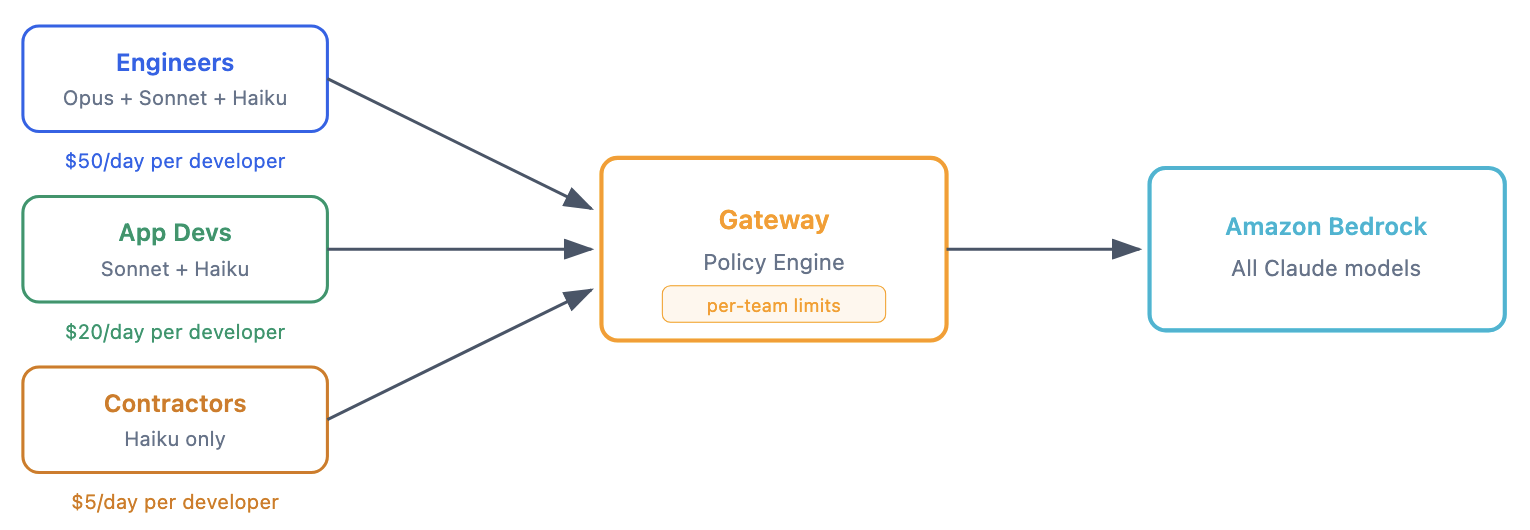
Figure 11: Multiple teams in a single account and Region, with team-wide daily, weekly, and monthly caps
Best for: organizations that want Amazon Bedrock as the preferred upstream with Claude Platform on AWS as overflow capacity. Note that cross-provider failover can change the applicable service terms and data-processing geography.
upstreams: - name: claude-platform provider: anthropicAws region: us-east-1 workspace_id: wrkspc_01ABCDEFGHIJKLMN auth: api_key: $ - name: bedrock provider: bedrock region: us-east-1 auth:Requests go to Amazon Bedrock first. Only on rate-limit or outage does the gateway fall back to Claude Platform on AWS.
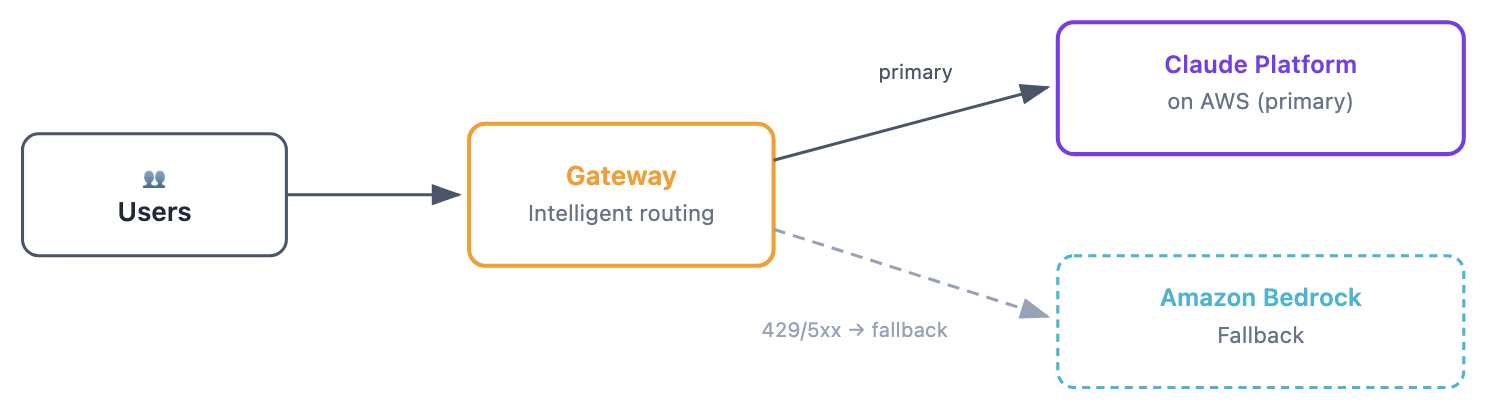
Figure 12: Single account with multiple upstreams, using Amazon Bedrock and Claude Platform on AWS for failover
Recommended for: organizations where developer tooling needs governance (SSO, spend caps, telemetry) but production applications call Amazon Bedrock directly with isolated quotas and native features.
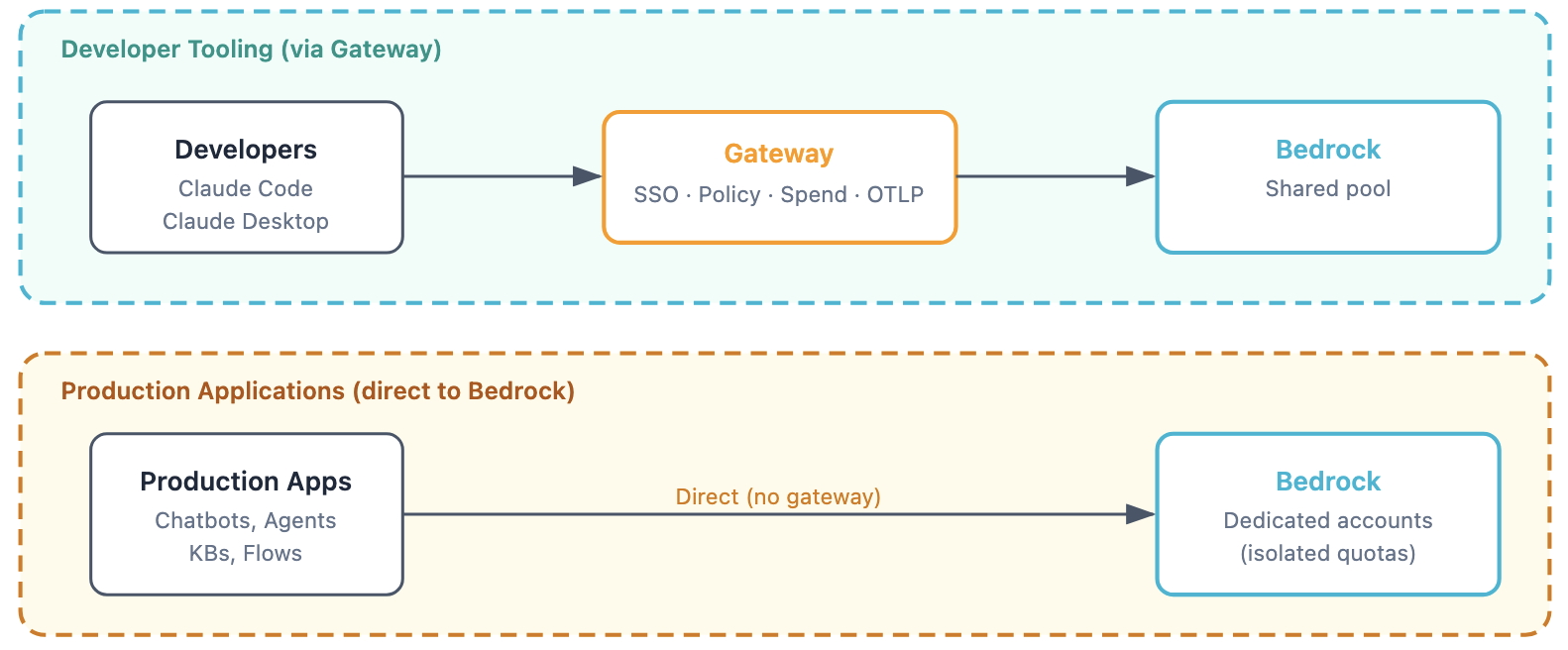
Figure 13: Production workloads stay on dedicated Amazon Bedrock accounts with native features such as Amazon Bedrock Knowledge Bases, Agents, and Flows that the gateway does not proxy
Recommended for: organizations where a central platform team operates the gateway and individual business units own their Amazon Bedrock access in separate accounts.
upstreams: - name: team-alpha provider: bedrock region: us-east-1 auth: aws_access_key_id: $ aws_secret_access_key: $ - name: team-beta provider: bedrock region: us-east-1 auth: aws_access_key_id: $ aws_secret_access_key: $Billing lands in each team’s account. The gateway routes to the correct upstream based on model configuration.
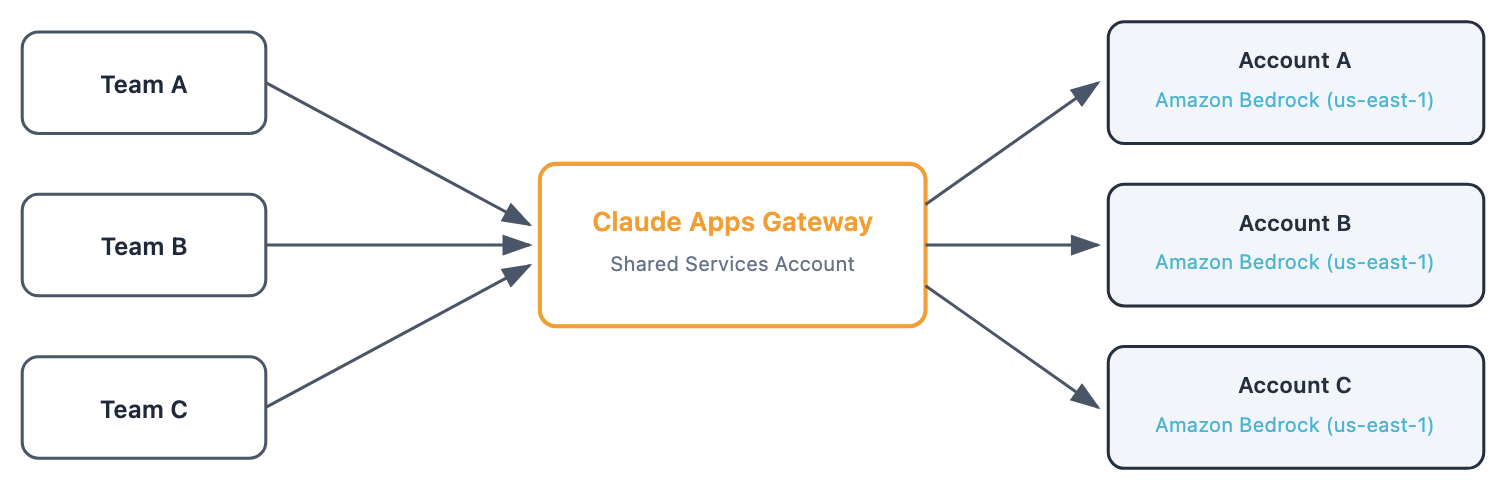
Figure 14: Multiple teams across multiple accounts, with per-account billing for Bedrock consumption
Gateway lives in a shared-services account. Each business unit’s Amazon Bedrock usage is billed to their own AWS account. The gateway doesn’t natively assume a different IAM role per upstream. Multi-account routing requires explicit credentials in the upstream config. Store these credentials in AWS Secrets Manager and rotate them on a schedule. Long-lived access keys are a significant security and operational tradeoff. Consider an external process that periodically refreshes short-lived AWS Security Token Service (AWS STS) credentials into the gateway’s environment to reduce exposure.
ConclusionThe Claude apps gateway gives platform teams a single control point for Claude Code and Claude Desktop on AWS. One container, one YAML configuration file. Five capabilities: SSO authentication, per-group model policies, per-user telemetry, multi-region routing with failover, and spend caps.
There is no per-seat license fee. When using Amazon Bedrock as the upstream, no developer data leaves your AWS account. Developers run the same claude binary they already know. The gateway is invisible to them after initial sign-in.
To get started, clone the accompanying GitHub repository and choose one of two tracks. Both provision the same Amazon ECS Fargate deployment: an internal ALB, Amazon RDS for PostgreSQL, ECR, Secrets Manager, an IAM task role, and an ADOT telemetry collector. Choose the idempotent setup.sh script for full visibility into every AWS call, or an AWS Cloud Development Kit (AWS CDK) stack for a managed lifecycle. For configuration details, refer to the claude apps gateway documentation.
About the authors
Dani is a Sr GenAI Specialist Solutions Architect at AWS and the SA lead for Amazon Bedrock Knowledge Bases. He helps enterprises across the world design and deploy generative AI solutions using Amazon Bedrock and Anthropic’s models and capabilities to build scalable, production-ready applications.

Bryn is a technologist, paragliding pilot, and Principal Solutions Architect at AWS. With more than 20 years of experience across telecommunications, banking, and software, he’s spent recent years deep in Applied AI, designing and building multi-agent AI products in production, and helping customers move from experimenting with generative AI to shipping it at scale. He loves defying gravity and talking through anything from agent architectures to how AI is reshaping software engineering itself.

Aamna is a Senior Specialist Solutions Architect for Generative AI focusing on Anthropic models and operationalizing and governing generative AI systems at scale on Amazon Bedrock. She helps ISVs solve their challenges, embrace innovation, and create new business opportunities with Amazon Bedrock. In her spare time, she pursues her passion for experimenting with food and discovering new places.