Amazon’s Echo Hub just became the control freak your smart home needed
Smart homes are supposed to make life easier. In reality, they often leave you juggling half a dozen apps just to dim the lights, check who’s at the front door, and figure out why the thermostat suddenly thinks you’re living in the Arctic.
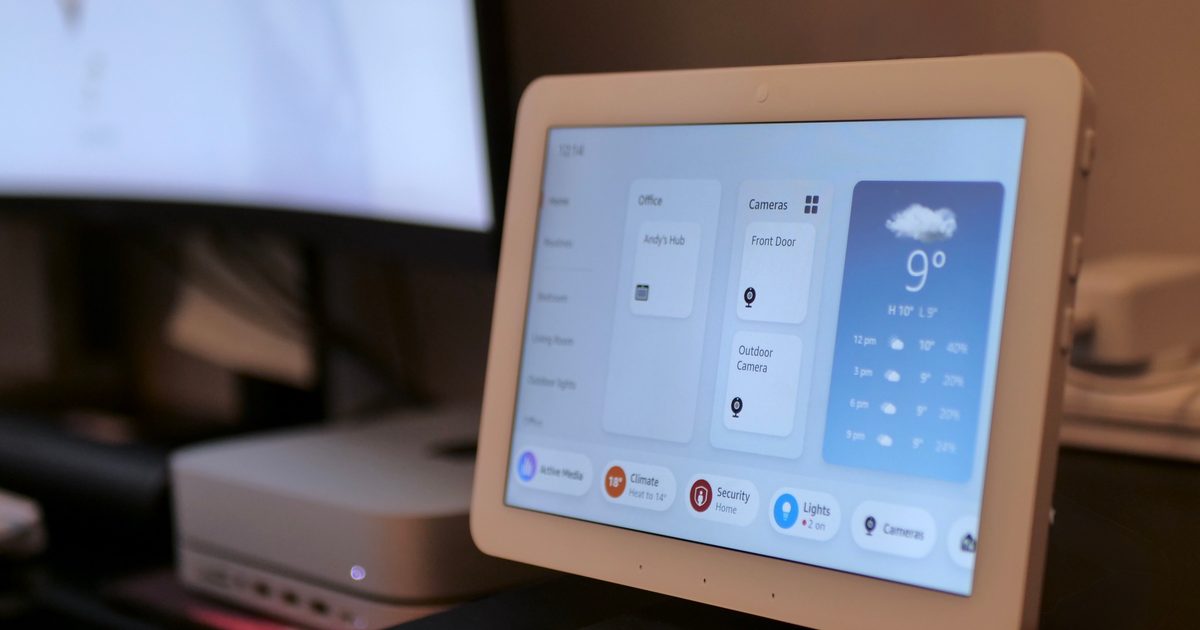
That’s the problem Amazon’s Echo Hub has always tried to solve. It’s essentially a dedicated touchscreen for your connected home, bringing your lights, cameras, locks, thermostats, alarms, and routines into one place. Now, Amazon is giving that experience a significant refresh with a redesigned interface that feels like the smart home dashboard many people have been waiting for. The update is rolling out as a free software upgrade for existing Echo Hub owners, and while it doesn’t change the hardware itself, it may make the device much more useful day to day.
The smart home dashboard is finally getting smarter
The biggest change is the redesigned interface, which puts customization front and center. Smart homes are deeply personal; the devices you use most are rarely the same as someone else’s. A parent may want instant access to cameras and door locks, while someone living alone might prioritize lighting scenes, music controls, and climate settings. Amazon’s updated dashboard acknowledges that reality.
Amazon
Instead of forcing everyone into the same layout, Echo Hub now offers more ways to organize, rearrange, add, or remove sections. Devices can be grouped by room or function, allowing homeowners to create a dashboard that actually reflects how they use their space. The result is fewer taps and less hunting through menus when all you want to do is turn off the bedroom lights before bed.
More importantly, device controls have become far more detailed. Rather than simply turning a light on or off, users can jump into precise brightness adjustments, tweak colors, and manage connected devices with greater control directly from the panel.
A control panel that wants to replace your phone
One of the biggest hurdles for smart home gadgets is convincing people to stop reaching for their smartphones. After all, most connected devices already have dedicated apps. Amazon appears to be tackling that challenge by making the Echo Hub capable of handling more tasks without forcing users back to a phone screen. Live camera feeds can now take center stage, including support for viewing multiple cameras simultaneously. For households with several security cameras, that’s a surprisingly practical feature. Instead of opening separate apps and cycling through feeds, you can see multiple views at once on a dedicated display.
Amazon
The hub also leans heavily into automation. Users can arm security systems, launch routines, switch between home and away modes, control lighting scenes, and manage connected devices with a single tap. For people who have invested heavily in Alexa-powered automations, the Hub increasingly feels like a mission-control center rather than a glorified smart display. Audio management has also received attention. Multiroom speaker groups can be controlled directly from the dashboard, making it easier to manage music throughout the house without having to shout voice commands from room to room.
Amazon
Meanwhile, Amazon hasn’t forgotten that an 8-inch display spends a lot of time sitting idle. Adaptive Content allows the screen to shift between photos and smart home controls depending on whether someone is nearby. It’s a simple idea, but it helps the device blend into a home rather than constantly look like a tablet mounted to a wall. The Echo Hub’s underlying strength remains its broad compatibility. With support for Zigbee, Thread, Bluetooth, Matter, Sidewalk, and Wi-Fi devices, it can serve as a central hub for a wide variety of connected products without requiring yet another bridge or box cluttering up a shelf.
At $179.99, the Echo Hub isn’t exactly an impulse purchase. But Amazon’s latest update pushes it closer to what many smart home enthusiasts have wanted all along: a dedicated control panel that lets you spend less time managing your smart home and more time simply living in it. And honestly, that’s how smart homes should have worked from the beginning.