Xteink X4 review: I doubted this tiny e-reader, but it fixed my poor screen habits
“A deceptively small powerhouse for the right audience.”
Pros
Light and pocketable
Buzzing open-source toolkits
Magnetic link with phones
Solid battery life for its size
Pretty affordable
Cons
No front or back light
Learning curve for buttons
Software is barebones
Quick Review
Every once in a while, an obscure brand comes out with an entirely new class of devices. One that may not be supremely practical, but it serves a niche purpose. Electronic ink readers are having a moment amid a rising wave of digital detox and dumb gadgets. Nothing has quite captured that spirit like Xteink’s pocket ereaders. And after traveling with it for nearly two months, I finally get the appeal.
The Xteink X4 is a deeply flawed and completely charming little pocket e-reader that drags the nostalgia of 90s tech kicking into the present day. At $69, this miniature gadget is built for digital minimalists who want to claw back some attention from the doomscrolling on their phones. It throws out modern conveniences, and what you get instead is a fistful of physical, unlabelled buttons and a humble chip that can only handle reading. What makes the X4 special isn’t anything on the spec sheet.
Instead, it’s the vibrant, open-source community that grew up around it. With custom firmware like CrossPoint, you can rip out the interface entirely and rebuild it, unlocking new fonts, cleaner layouts, wireless file transfers, and a whole bunch of reading-friendly features. And oh, it snaps magnetically to the back of your phone, so your books are never more than a glance away. It won’t quite stand in for a premium reading tablet, and it isn’t trying to. But the Xteink X4 truly thrives as a secondary device that’s compact, unique, and darn cheap to become an impulse buy.
Xteink X4 specs: What’s packed inside this cutesy e-reader?
Display4.3 inchResolution220 PPIDimensions114 × 69 × 5.9 mm (4.49″ × 2.72″ × 0.23″)Weight77gCPUESP32StorageComes with 16 GB microSD card; supports expansion up to 256 GBConnectivityWi-Fi 2.4 GHz & Bluetooth® wireless technologyPortsUSB Type-CPhysical ButtonsPower Button, Page-Turn ButtonsBattery650 mAh (A single charge lasts up to 14 days, based on 1–3 hours of reading per day)Supported FormatsDocument: EPUB, TXT Image: JPG, BMP Fonts: BINColor OptionsSpace Black / Frost WhiteLanguagesEnglish, Simplified Chinese, Traditional Chinese, and JapaneseFront LightNoTouchscreenNoOtherDoes not support 3rd-party Apps
Xteink X4 design and build quality: When size is the real charmer
Nadeem Sarwar / Digital Trends
The sheer footprint (or the lack of it) is the Xteink X4’s defining trick, and it’s the aspect that almost anyone will praise first. Measuring in at a compact 114 x 69 x 5.9 millimeters and tipping the scales at just 74 grams, it’s roughly the size of a credit card and far lighter than any phone you own. This is an everyday-carry device in the perfect sense, something that wants to replace the classic iPod charm with a reading device that you barely feel in your pockets.
Nadeem Sarwar / Digital Trends
The build feels solid, though the shell is a tad slippery. Thankfully, due to the featherweight profile, the slight lack of grip is almost a non-issue. A headline hardware feature is the MagSafe-compatible magnetic attachment. All you need to do is clip the e-reader onto the back of a Qi2-ready phone (aka one with a built-in magnetic ring, like the Pixel 10 Pro or the iPhone 17 Pro) and, voila, you bestow a secondary E-Ink screen upon your phone. Yes, it’s spiritually the same concept as the Yotaphone.
Nadeem Sarwar / Digital Trends
The execution is where things get janky. Because modern phones now come with enormous camera bumps, the X4 often refuses to sit flush. It perches slightly crooked, hangs past the bottom edge, or knocks straight into the camera visor. Xteink clearly saw this coming and tossed a pair of adhesive magnetic rings in the box so that you can stick the reader to an older phone, a case, or even a notebook instead.
Nadeem Sarwar / Digital Trends
With no touchscreen, the X4 lives and dies by its physical buttons. You navigate using volume-rocker-style keys on the right edge and a pair beneath the display. Tactile page turns are usually a feature people adore on an e-reader, but here the buttons are completely unlabelled. Worse, some are two-sided, doing entirely different jobs depending on which edge you press.
Nadeem Sarwar / Digital Trends
The result is a steep (read: maddening) learning curve and a lot of accidental presses while you’re hunting for settings or trying to back out of a menu. But once you get the hang of it, which is easier for any person who has ever used the three-button navigation scheme on an Android phone, you won’t go back.
Nadeem Sarwar / Digital Trends
The hardware carries a few other rough edges that quietly remind you what you paid. The MicroSD slot, home to the bundled 32GB card, is recessed so deep into the chassis that you’ll need a long fingernail, a paperclip, or a SIM ejector pin to get the card in or out. But hey, you’re not taking the card in or out every single day. Plus, file transfers can happen without ever touching the card in the first place.
Score: 8/10
Xteink X4 display experience and quality: Enough for reading, as long as there’s light
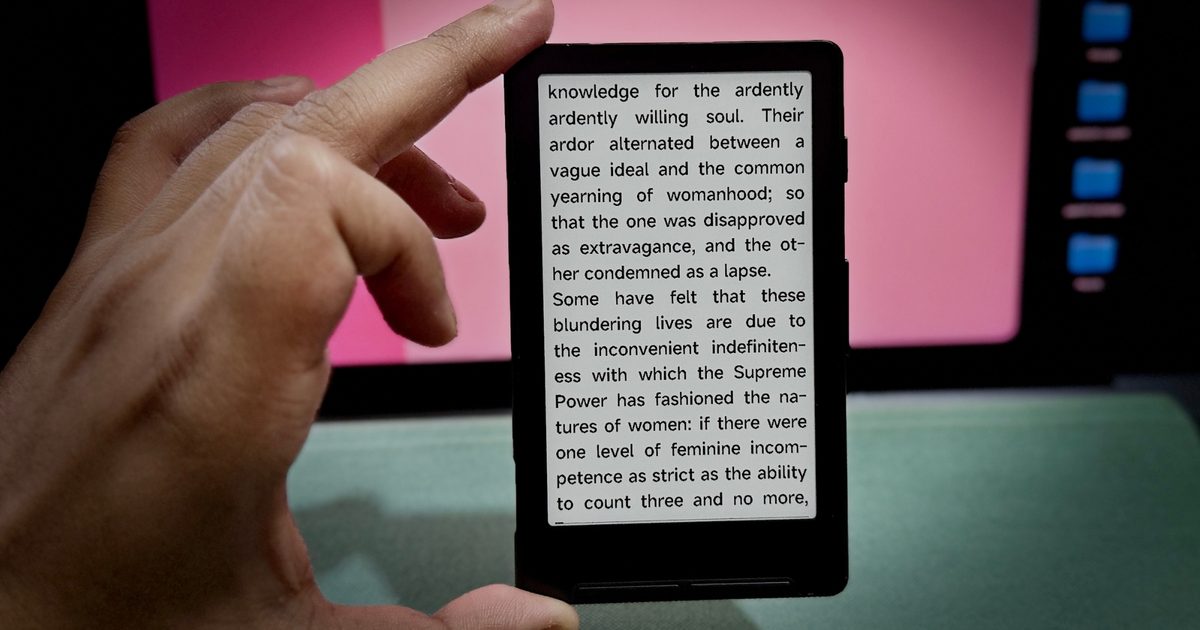
The Xteink X4 comes equipped with a 4.3-inch E-Ink display that delivers a pixel density of 220 PPI. That’s not eye-popping, nor is it modestly high by the segment standards, especially compared against the Amazon Kindle or Kobo Libra 2 with their sharper 300 PPI panels. The panel on the Xteink X4 looks noticeably softer, and it’s easy to spot a few jagged edges on fine text and faint pixelation in stylized fonts.
Nadeem Sarwar / Digital Trends
For a device this small, though, the resolution is more than enough and stays easy on the eyes. The size does mean screen real estate is tight. Even at the smallest font, you’re looking at only a few paragraphs at a time. That sounds like a knock, but it quietly changes the rhythm of reading. Fewer words per page means you’re turning constantly, and that steady, physical tap-tap builds a momentum that keeps an easily distracted brain locked in.
There are two key omissions here that are worth flagging. You don’t get a touchscreen, and neither do you get a built-in display illumination tech. Simply put, there’s no front light or backlight. The screen is sunlit, or lit by ambient light. If you plan to read in bed, or anywhere dim, you’re entirely at the mercy of the room’s lighting or a clip-on book light.
Formatting on the stock software is a mess, too. The native OS forces justified text you can’t switch off, which leaves big awkward gaps between words and scatters formatting errors through ordinary EPUBs. It manages basic legibility, but not much beyond it. I restricted myself to “EPUB older format” files from open and public repositories to avoid any formatting hassles.
Score: 7/10
Xteink X4 performance: Gets the job done, and that’s all
Nadeem Sarwar / Digital Trends
Under the hood, the Xteink X4 is an entirely different animal compared to Android-based E-Ink readers, such as the phone-like Boox Palma 2. Instead of a traditional system on a chip, it runs on an ESP32, a low-power, highly efficient microcontroller you’d normally find buried in smart home gadgets and DIY maker projects.
That architecture comes with severe limits, chiefly around 380 KB of usable RAM. To stay upright, the system leans on aggressive caching straight to the MicroSD card. Owing to these bottlenecks, the performance is honestly more competent than it has any right to be for reading text.
Page turns are reasonably snappy, and skimming the simple menus is responsive enough that it never yanks you out of the moment. Thankfully, you won’t run into any ghosting issues, as is the case with a majority of e-ink readers out there, including heavyweights like the Amazon Kindle Scribe Colorsoft that cost nearly ten times as much.
Nadeem Sarwar / Digital Trends
There’s both Wi-Fi and Bluetooth, though using either takes some patience. Getting books out of the box means dealing with a rudimentary file browser. You can drag and drop onto the MicroSD card from a computer, or try the wireless transfer by typing the X4’s local IP into a desktop or phone browser to drop files over the network.
Since the ESP32 is an open platform that DIY enthusiasts love to tinker with, people have pushed the X4’s performance to absurd places. Tinkerers have flashed it to run a stripped-down Doom (of course), play painfully choppy Nintendo games, act as an internet-connected fridge calendar via TRMNL software, and more such fun exercises. It handles every one of these tasks pretty terribly, but the fact that it can pull them off all tells you how flexible the hardware underneath really is.
Score: 8/10
Xteink X4 software: Barebones, for a purpose
If there’s a single story that defines the X4, it’s the gulf between the official stock software and the open-source firmware that pulled the device back from obscurity. Booting up the X4 for the first time can be a little intimidating. Once you’re in, the stock software is skeletal, and I am being generous here, something that makes the Kindle software feel feature-rich.
Nadeem Sarwar / Digital Trends
You get a basic file explorer, a recent-books tab, a settings menu, and that’s about it. Native format support is narrow, opening only TXT and basic EPUBs for books, BMP and JPG (for images), and BIN fonts. In the name of customization, you can only pick between “small” or “medium” text, three line-spacing options, and no margin control whatsoever. Moreover, book illustrations often fail to render properly.
Nadeem Sarwar / Digital Trends
The Xteink X4’s saving grace is CrossPoint, a custom open-source firmware supported by an enthusiastic crowd of tinkerers. Installing it takes about 20 minutes, and it requires a full flash using a web browser, but the process is fairly straightforward. Once it’s installed, CrossPoint turns the X4 into an entirely different beast, one that solves plenty of its basic e-reader problems.
Nadeem Sarwar / Digital Trends
It tears out the baffling stock UI and replaces it with a clean, intuitive menu system that feels like a nod to classic iPods. More importantly, it fixes the formatting woes, adds meaningful margin controls, button labels, and a far wider selection of font sizes and styles. It also offers better wireless transfer and plays well with Calibre, too.
Nadeem Sarwar / Digital Trends
The most beloved addition, though, is how easily you can sideload custom sleep screens. Most importantly, CrossPoint also puts on-screen labels atop the physical buttons, which kills the learning curve, taking the guesswork out of pressing buttons and accidentally raising hell.
Score: 7/10
How the Xteink X4 tempered my doomscrolling
Now, this is the part that I had at the back of my mind even before I unboxed the device. I picked up the Xteink X4 as a curiosity, half-assuming it would end up in the drawer with the other gadgets I swore I’d use. Instead, it quietly rearranged how I spend the dead minutes of my day.
You see, doomscrolling thrives on convenience. Your phone is in your hand, the feed is already loaded, and your thumb knows the way before your brain catches up. What the Xteink X4 does is simply act as a zero-friction option for an entirely different dopamine hit, and that’s reading. And since it magnetically clings to the back of my phone, it’s the first thing my fingers hit when I reach for a distraction while standing in a queue, swaying on a crowded bus, or in those restless ten minutes before sleep.
Nadeem Sarwar / Digital Trends
The book is simply closer than the feed now.
There’s no notification risk to my reading session. There are no apps. I can’t access a browser. Essentially, I am cut off from any digital distraction. Period. Suddenly, the tiny display showing just a few paragraphs at a time turns into a meaningful feature. You tap through pages quickly, feel forward motion, and twenty minutes vanish into a chapter instead of diving into a Reddit rabbit hole
I won’t oversell it, though. The Xteink X4 didn’t fully reprogram my brain, and the urge to scroll hasn’t fully vanished. But it has lowered the barrier to reading, a habit that has been fading from my daily schedule while mindless social media surfing keeps rising. Like me, if you’ve ever found yourself searching for a gentle solution to take a break from the feed, this is an effective nudge, and it works because it does so little. Dumb minimalism, if I can call it that.
Xteink X4 battery life: Tiny, and it’s okay
It’s a small device, so don’t expect any fireworks. But that’s not bad news. Between the ESP32’s measly power draw and the native efficiency of E-Ink panels, the X4 posts excellent battery life figures, despite packing a supremely small 650 mAh battery cell. My OnePlus 15, for example, features a 7,300 mAh battery pack.
Nadeem Sarwar / Digital Trends
E-Ink only sips power when the page refreshes, and with no front-light or a demanding operating system dragging on the battery, that small cell can stretch for miles. Under normal use, which can stand between one and three hours of daily reading, you can expect around two weeks of mileage per charge. Interestingly, CrossPoint firmware seems to offer even better mileage.
When the X4 finally drains, a standard USB-C port on the bottom tops it back up quickly. There are no wattage requirements or cable mandates to deal with here. Any standard USB Type-C cable works. I charged it with my power bank, laptop, and most frequently, with my smartphone. I love the convenience and frugal requirements.
Score: 8/10
Should you buy?
The Xteink X4 isn’t an e-reader for everyone, and it makes no case for that in the first place. If you’re settled into the Kindle or Kobo ecosystem, expect a clean and bug-free experience the moment you switch a device on, depend on a touchscreen, or read in the dark often, walk away from this one. It demands a willingness to troubleshoot, work around quirks, and manage your own DRM-free files.
Nadeem Sarwar / Digital Trends
But if you’re a digital minimalist, a tinkerer, or just someone aching to wrestle their attention back from the endless scroll, the X4 is a small revelation. At $69, it sits squarely in the impulse buy territory. It delivers an eerily comfortable reading experience because it weighs nothing and snaps to your phone, so it’s always there, dropping the barrier to cracking open a book while you wait in line or ride the bus. If that sounds appealing, put this on your wishlist, or shopping cart.
Why not try
Boox Palma 2 — If you love the phone-sized form factor but won’t tolerate the compromises, the Boox Palma 2 is the most rewarding step-up. It offers a sharper display with a built-in front light, a touchscreen, and the full-fledged Android experience, which means you can pull the Kindle app, Spotify, or any other app you want straight from the Google Play Store. I use mine to watch YouTube podcasts and send the occasional Slack message.
Amazon Kindle — For anyone who just wants reliability and a low price, the entry-point Amazon Kindle is hard to beat. It’s bigger (and heavier) than the Xteink X4, but it’s still pretty portable. This one offers a sharp touchscreen, a built-in light for reading at night, and direct access to Amazon’s vast ebook store.
Kobo Libra 2 — If you’re chasing tactile page-turn buttons without giving up polished software, the Kobo Libra 2 is an excellent choice. You get a larger display with higher pixel density, waterproofing, and native OverDrive/Libby integration for borrowing library books straight from the device.
How we tested
I carried the Xteink X4 with me as a standalone device as part of my everyday carry (EDC) for two months. I carried the pocket ereader in the supplied rubberized case, while all the files were stored on the 32GB microSD card that came with the package.
All the books tested were in EPUB format, downloaded straight from copyright-free sources such as Project Gutenberg. I preferred transferring books using the WiFi hotspot system, which works equally well across mobile and desktop, depending on where the books are originally stored.
Even though I played around with the more advanced Crosspoint firmware, all the testing was conducted when the device was running the pre-installed software and Xteink XT-Cloud tools. For charging the device, I used a standard power bank, and on one occasion, I hooked it up to my MacBook Pro to juice up the tiny ereader.






Comments (0)